How to Write a Website RFP That Produces Accurate, Comparable Proposals

By Adam

How to Write a Website RFP That Produces Accurate, Comparable Proposals

If you are learning how to write a website RFP, start with one principle: a good RFP does not tell an agency exactly what to design. It gives the agency enough context to understand the problem, recommend the right approach and price the work responsibly.

That distinction matters. When an RFP is too vague, every agency fills in the gaps differently. One proposal may include content migration, accessibility testing and post-launch support; another may not. The totals look different, but so do the assumptions behind them. You are no longer comparing like with like.

When an RFP is too prescriptive, the opposite problem appears. It can lock the project into features or technology before the team has explored what users actually need. Strong agencies may spend more time complying with a predetermined solution than showing you how they think.
The best website RFP sits between those extremes. It is clear about outcomes, audiences, constraints and responsibilities while leaving room for expert recommendations. As a Toronto web design partner, we see the strongest projects begin with that kind of clarity long before a homepage mockup is created.

Gif of Kevin Hart Saying "You Gone Learn Today"

What is a website RFP?

A website request for proposal, or RFP, is a document that explains your organization, the reason for the project, the results you want, the known scope, the procurement process and what vendors should include in their responses. It gives potential partners a common starting point.
An RFP is not the same as a complete technical specification. At the proposal stage, you may not know the ideal sitemap, content model or implementation method. That is normal. Discovery exists to turn business and user needs into a well-defined solution.

A useful way to think about it

Your RFP should define the destination, the passengers and the non-negotiable road conditions. The selected agency should still have room to recommend the route.

Do you actually need an RFP?

Not every website project needs a formal RFP. A smaller business with a clear decision-maker may get further with a discovery call, a written brief and a detailed proposal. A formal RFP becomes more useful when several stakeholders must agree, your organization has procurement requirements, the project has significant complexity, or you need to evaluate multiple vendors through a consistent process.

You will probably benefit from an RFP if:

  • The website serves several audiences with different tasks or priorities
  • The project includes many pages, integrations, languages, locations or content owners
  • Your board, leadership team or procurement department requires a documented selection process
  • Accessibility, security, privacy or hosting requirements must be evaluated
  • Multiple agencies will be invited, and the decision needs to be defensible
  • You need internal alignment before asking anyone to price the work

If your team is not ready to answer the foundational questions below, a short discovery or needs-analysis engagement may be more valuable than issuing an RFP immediately. Our own website design process Take a look at our website design process begins with discovery for exactly this reason:

Decisions are better when everyone understands the problem first.

Before you write: align the internal team

The writing is rarely the hardest part. The hard part is getting internal agreement on what the project must accomplish. A 1 hour alignment session can prevent weeks of contradictory edits later.

Before drafting the RFP, identify:

  • The executive sponsor and final decision-maker
  • The day-to-day project lead
  • The departments or user groups that need to be consulted
  • Who owns content, approvals, technology, privacy and accessibility
  • The approved budget or a realistic working range
  • Which requirements are mandatory, desirable or still open to recommendation

That last distinction is especially useful. If you mark every request as mandatory, vendors cannot show you where trade-offs exist. A simple “must have / should have / could have” label makes priorities visible without pretending every decision is final.

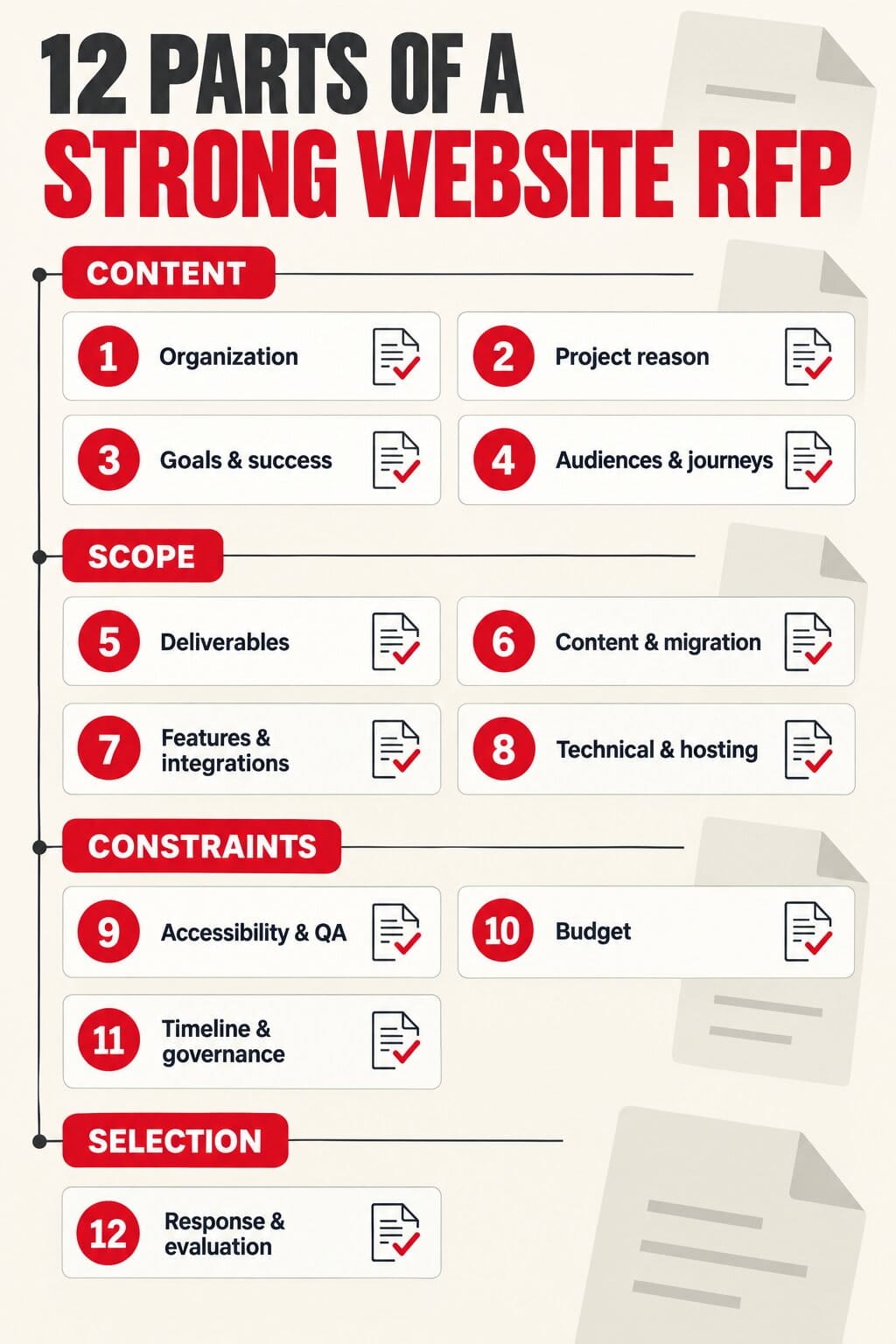
The 12 sections of a strong website RFP

You can use the following structure as a practical website RFP template. The amount of detail will vary by project, but each section should give agencies information they can use to shape their approach, team, schedule and price.

1. Organization overview

Introduce the organization in plain language. Explain what you do, who you serve, where you operate and how the website supports the broader mission or business model. Link to your current site, strategic plan or annual report only when it adds useful context. Keep this section focused. A vendor needs enough background to understand the organization, not its complete history.

2. The reason for the project

Describe what is driving the redesign now. Is the current site hard to update? Has the organization changed? Are users unable to find important information? Is the visual identity dated? Are accessibility, performance, security or integration issues creating risk? Be candid. Specific problems lead to specific responses. “We need a modern website” is far less useful than “Our navigation reflects our internal departments, while users arrive by service need and cannot find the right next step.”

3. Goals and measures of success

List a small number of project goals and explain how you will recognize progress. A redesign might aim to increase qualified inquiries, improve donation completion, reduce calls for routine information, make mobile tasks easier, support recruitment or give staff more control over publishing. Where possible, include a baseline and a measurement method. If no baseline exists, say that measurement planning should be part of discovery. Avoid promising an arbitrary traffic or conversion increase before the strategy and data have been reviewed.

4. Audiences and priority user journeys

Name the people who use the site and what they are trying to accomplish. “General public” is rarely enough. A professional association may serve members, prospective members, employers, media, staff and the public. A construction company may serve property owners, general contractors, architects and job applicants. For each priority audience, describe two or three important tasks. This gives agencies a better basis for discussing information architecture, content and calls to action.

5. Scope and expected deliverables

State what you believe is included: research, strategy, sitemap, wireframes, visual design, copy support, development, CMS setup, content entry or migration, integrations, testing, training, launch and post-launch support. If you want vendors to recommend the right scope, say so and ask them to explain any changes.

Separate firm requirements from optional items. For example, a member portal may be a later phase, while single sign-on planning must be considered now. That separation lets agencies price the core project and alternatives clearly. If you are still deciding between a template-based approach and a fully custom build, describe the outcomes and constraints instead of prescribing one. An experienced partner can explain the trade-offs within its proposal for custom website design and development.

6. Content responsibilities and migration

Content is one of the biggest sources of schedule and budget variance, yet it is often summarized in one sentence. Provide a current page count, note which sections will be removed or consolidated, and identify documents, news, profiles, products, events or multilingual content that may need migration. Clarify who will audit, write, edit, approve and enter content. If the answer is not known, ask vendors to price content strategy, copywriting coordination and migration as separate options. Also identify who will supply photography, video, brand assets and legal text. On most WordPress websites, you can go to [yoururl.com]/sitemap.xml to get a full list of pages on your website.

7. Functionality and integrations

Describe the user need behind every requested feature. Instead of asking for “a searchable directory,” explain who searches, what they search by, what information appears and where the data comes from. List known systems such as a CRM, association-management platform, donation processor, email-marketing tool, job board, event platform, analytics account, payment gateway or single sign-on provider. Include documentation and technical contacts where possible. If a current integration is unreliable, say so.

8. Technical, hosting, security and privacy context

Share the current CMS, hosting environment, domain ownership and any contractual constraints. Note required environments, backup expectations, disaster recovery, data residency, security review, privacy review and third-party services that the selected partner will need to coordinate. Do not invent technical requirements because they sound safe. State the organizational or regulatory need and invite the agency to explain how its proposed architecture addresses it. Your IT and privacy leads should review this section before release.

9. Accessibility, performance and quality assurance

Replace vague phrases such as “the website must be accessible” with testable expectations. Identify the accessibility standard and conformance level that applies to your organization, the types of automated and manual testing expected, the required documentation and who is responsible for fixing issues found before launch.

The same applies to performance and browser support. Define priority devices, critical journeys and acceptance criteria, then ask vendors to describe their testing process. Use the current W3C Web Content Accessibility Guidelines and applicable Ontario requirements as starting points, and confirm your organization’s obligations with the appropriate legal or accessibility advisor.

10. Budget and commercial assumptions

Include an approved budget or a credible range. A budget is not an invitation for every agency to charge the maximum. It lets vendors determine whether the objectives are realistic and propose the best mix of research, design, development and support within the available investment. Ask for fees by phase and identify what should be priced separately: taxes, licensing, stock assets, hosting, ongoing maintenance, third-party subscriptions, travel and optional features. If you are still establishing the budget, our guide to how much a website costs in Canada explains the variables that tend to move a project up or down.

11. Timeline, governance and procurement process

Provide the desired launch window and the business reason behind it. Then list the RFP issue date, deadline for questions, response date, interview period, selection date and anticipated kickoff. For a moderately complex private-sector process, giving agencies roughly 2-4 weeks to respond is often more realistic than asking for a thoughtful proposal in a few days. Explain how many stakeholder groups will review the work, who consolidates feedback and how quickly approvals can be provided. If your organization is subject to a formal procurement policy, follow the current rules for communications, addenda, evaluation, conflicts and records.

12. Proposal format and evaluation criteria

Tell vendors exactly what to submit and in what order. Request a concise understanding of the challenge, proposed approach, project team, relevant work, schedule, assumptions, exclusions, fee breakdown, references and contract exceptions. Set a reasonable page limit if long responses would burden the evaluation team.

Publish the evaluation criteria and apply them consistently. Price matters, but it should not be evaluated in isolation from the approach, relevant experience, team and risk. For regulated or public-sector procurement, have the final criteria and process reviewed by the appropriate internal or legal authority.


12 Parts of. a Strong Website RFP Infographic

Write requirements that leave room for expertise

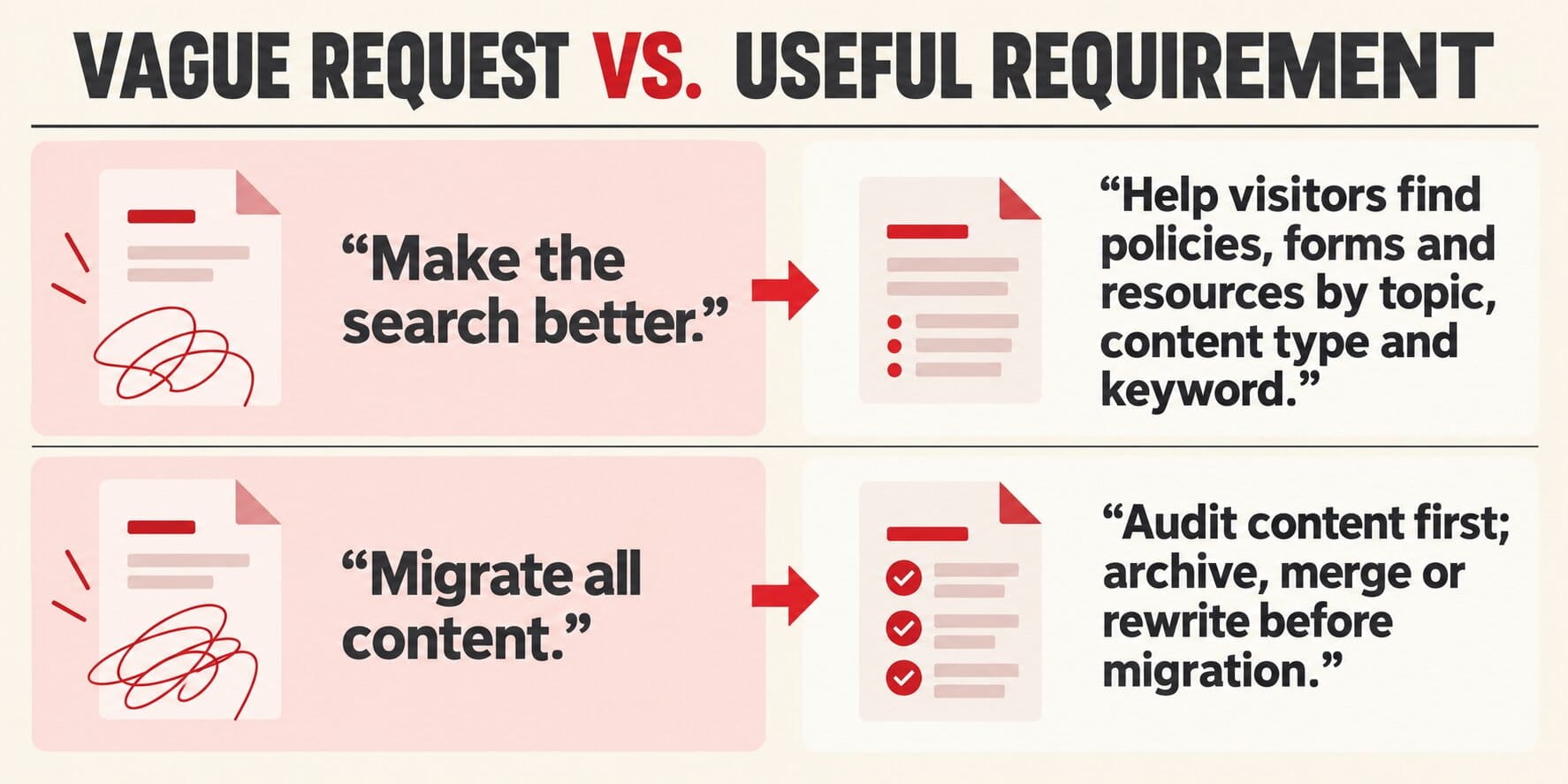
The most useful requirements describe the user, the job to be done, the constraints, and the desired result. They do not force a solution unless the solution is genuinely non-negotiable.

Too Vague or Prescriptive:

“The new site needs a better search.”

More Useful Requirement:

“Visitors need to find policies, forms and resources by topic, content type and keyword. The current search often surfaces outdated PDFs.”

Too Vague or Prescriptive:

“Build the site with this page-builder plugin.”

More Useful Requirement:

“The communications team needs to create approved page layouts without developer support. Explain how your CMS approach maintains consistency and accessibility.”

Too Vague or Prescriptive:

“Migrate all content.”

More Useful Requirement:

“The current site contains about 1,200 pages and 800 documents. We expect to archive, merge or rewrite a significant portion. Price discovery and migration assumptions separately.”

Too Vague or Prescriptive:

“Make it WCAG compliant.”

More Useful Requirement:

“State the applicable WCAG version and level, required manual and automated testing, documentation, remediation responsibilities and acceptance process.”

Vague vs useful RFP requirements infographic

How to write a website RFP that makes proposals easier to compare

A shared RFP is only half of the comparison framework. The response instructions should also make agencies expose their assumptions in the same places.

  • Ask every agency to organize its response in the same section order.
  • Require a phase-by-phase fee table and a separate list of optional costs.
  • Ask vendors to state what they expect your team to provide, including content, feedback, system access and approvals.
  • Request a clear list of exclusions and third-party fees rather than assuming they are included.
  • Ask who will actually do the work, not only who will attend the pitch.
  • Request two or three relevant examples and explain what makes each one comparable to your project.
  • Give all invited vendors the same answers to material questions through a shared addendum.
  • Use a scorecard before opening the proposals so impressive presentation alone does not move the criteria.

When reviewing experience, look for evidence that the team can solve problems with similar complexity. Not necessarily a website that looks like the one you imagine. You can review recent website projects to see how Ankit Designs approaches organizations with different audiences, content structures and technical needs.

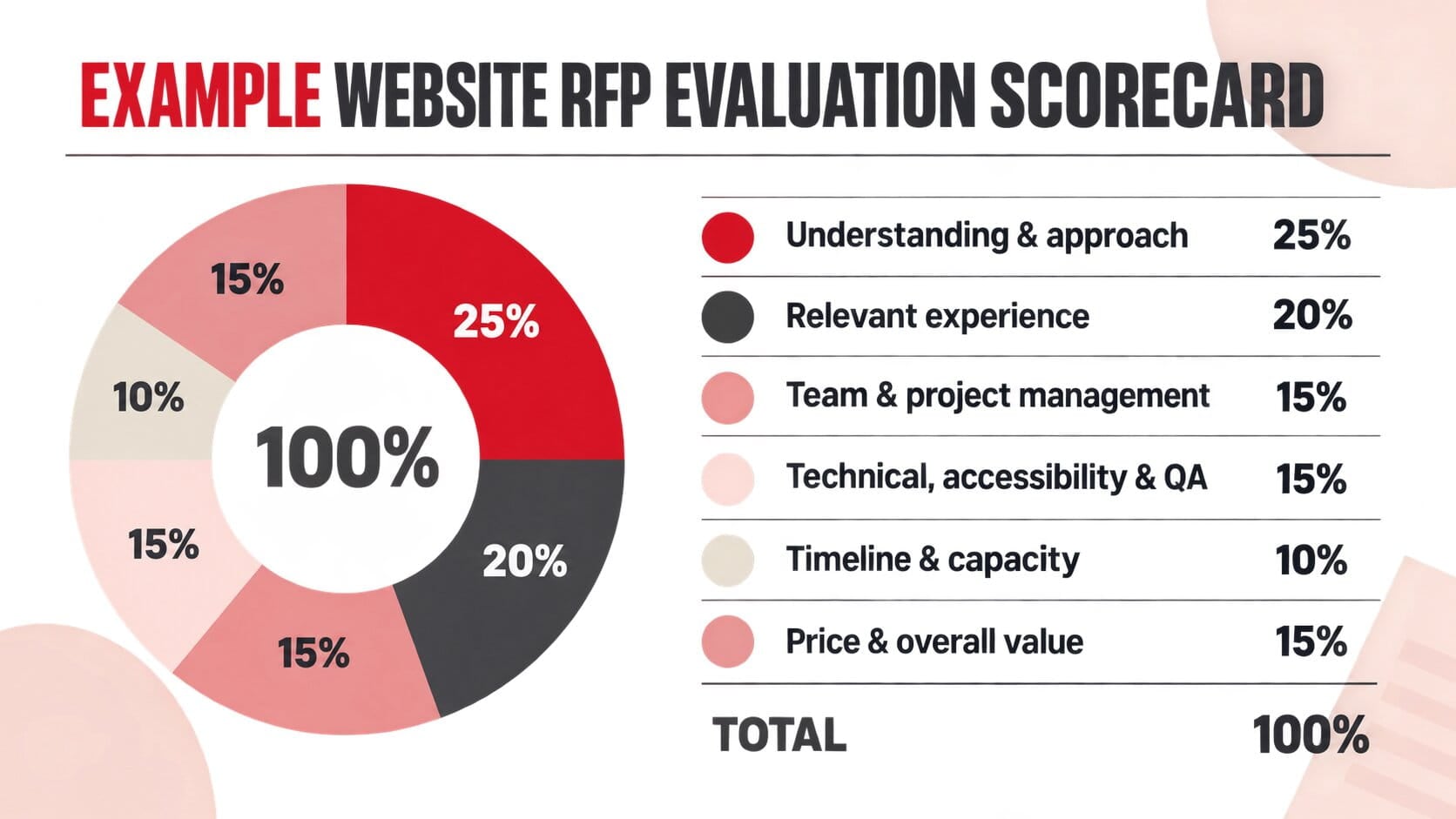
Example website RFP evaluation scorecard

The weighting below is an example, not a universal formula. Adjust it to the risks and priorities of your project, disclose the final criteria in the RFP, and follow any procurement rules that apply to your organization.

Understanding and approach 25%

A clear reading of the problem, a credible process and useful questions or recommendations.

Relevant experience 20%

Evidence of solving comparable audience, content, governance or integration challenges.

Team and project management 15%

Named delivery team, clear responsibilities, communication rhythm and decision support.

Technical, accessibility and QA 15%

A practical implementation and testing approach tied to your stated requirements.

Timeline and capacity 10%

A realistic schedule, dependencies and evidence that the team is available.

Price and overall value 15%

Transparent assumptions and a scope that uses the available budget responsibly.

TOTAL 100%

Score consistently, then discuss material risks and references before the final decision.

Example Website RFP Evaluation Scorecard Infographic

Common website RFP mistakes

Mistake #1: Hiding the budget

Without a range, agencies may propose fundamentally different levels of effort. You receive more bids, but not necessarily more useful choices.

Mistake #2: Using a copied feature list

Requirements borrowed from another organization often introduce cost without serving your users. Connect each feature to a real need.

Mistake #3: Ignoring content until after design

Content volume, quality and ownership affect the sitemap, templates, migration effort and launch date. Treat content as a workstream from the beginning.

Mistake #4: Writing for insiders

Define acronyms, programs and systems. A vendor should not need institutional knowledge to understand the brief.

Mistake #5: Setting a fixed launch date without review time

The agency controls its work, but your team controls feedback, content and approvals. Show both sides of the schedule.

Mistake #6: Inviting too many vendors

For a private invitation, a focused shortlist is easier to manage and more respectful of the effort involved. Public or regulated procurements may require a different process.

Mistake #7: Choosing the lowest total before comparing scope

A lower number may exclude migration, testing, training or support that another proposal includes. Normalize scope and assumptions before comparing price.

Mistake #8: Requesting speculative design work

Free homepage concepts reward presentation speed, not discovery or long-term fit. Evaluate thinking, process and relevant work instead.

Website RFP checklist before you publish

  • The project problem and business reason are clear.
  • Goals are prioritized and connected to observable outcomes.
  • Primary audiences and user tasks are described.
  • Mandatory, desirable and optional requirements are separated.
  • Content volume, ownership and migration assumptions are visible.
  • Known integrations and technical contacts are listed.
  • Accessibility, performance, privacy, security and QA expectations are testable.
  • The budget or working range is included.
  • The timeline includes vendor questions, interviews, selection, kickoff and internal approvals.
  • The response format makes scope, fees, assumptions and exclusions comparable.
  • Evaluation criteria are disclosed and approved internally.
  • One person owns vendor communications and distributes material answers consistently.

For Nonprofits and Associations

Add governance, stakeholder consultation, donation or membership systems, multilingual needs, document archives and accessibility responsibilities to the checklist. Our team’s experience with website design for nonprofits can help you identify the questions that are easy to miss in a generic RFP.

Frequently asked questions about website RFPs

What should a website RFP include?

At minimum, include your organization’s background, project problem, goals, audiences, known scope, content responsibilities, integrations, technical and accessibility requirements, budget, timeline, response format and evaluation criteria. The best RFPs also distinguish mandatory requirements from areas where the agency can recommend an approach.

Should we include our website budget in the RFP?

Yes, include an approved budget or a realistic range whenever possible. It helps agencies determine fit, allocate the right team and show what can be achieved at different investment levels. Ask for optional items separately if the final scope may change.

How long should agencies have to respond?

The right period depends on complexity and your procurement rules. For a moderately complex private-sector RFP, roughly 2-4 weeks is often workable. Allow time for questions and issue material answers to all participants consistently.

How many web design agencies should we invite?

For a private process, a thoughtful shortlist of 3-5 qualified agencies is usually more manageable than inviting a large field. If your organization is subject to public or regulated procurement, use the process and thresholds that apply to you.

What is the difference between an RFP and an RFQ?

An RFP evaluates a proposed solution, approach, team and price. An RFQ is more suitable when the scope is already standardized and price or rate comparison is the main task. Complex website redesigns usually require judgment beyond a simple quote.

Should an RFP specify WordPress?

Specify WordPress when your organization has a valid platform requirement, existing investment or integration constraint. Otherwise, describe your authoring, governance, security and integration needs and ask agencies to explain their recommendation. Ankit Designs specializes in WordPress, but the platform should still serve the project.

A better RFP creates a better starting point

The goal of an RFP is not to remove every unknown. It is to make the important unknowns visible, give qualified agencies the same context and create enough structure for a fair decision. When the brief is grounded in goals, users, content and constraints, proposals become more accurate and easier to compare. Just as importantly, the first phase of the project can focus on improving the solution instead of correcting assumptions that should have been discussed before selection.

Ankit Designs is an award-winning team working with organizations across Toronto and beyond. Our Build It Right approach starts with careful discovery, clear communication and a plan that can hold up through design, development, launch and support. If you are preparing an RFP, or deciding whether you need one, start a conversation with our team. We will tell you what information would help us give you a responsible proposal.

Get in touch with our team today to schedule a consultation and discover how we can create a website tailored to your business goals.

About the author

I'm nobody's taxi service but I take pride in driving the bus! Upbeat, energetic serial entrepreneur on the quest to serve and help people. I enjoy long walks on short beaches and adventurous, adrenaline-pumping activities. I'm a normal bloke doing abnormal bloke things!
Read more posts by Adam
Phone Icon
Call Us
Contact Icon
Contact