E-Commerce Website Design: From Catalogue to Checkout
E-Commerce Website Design: From Catalogue to Checkout
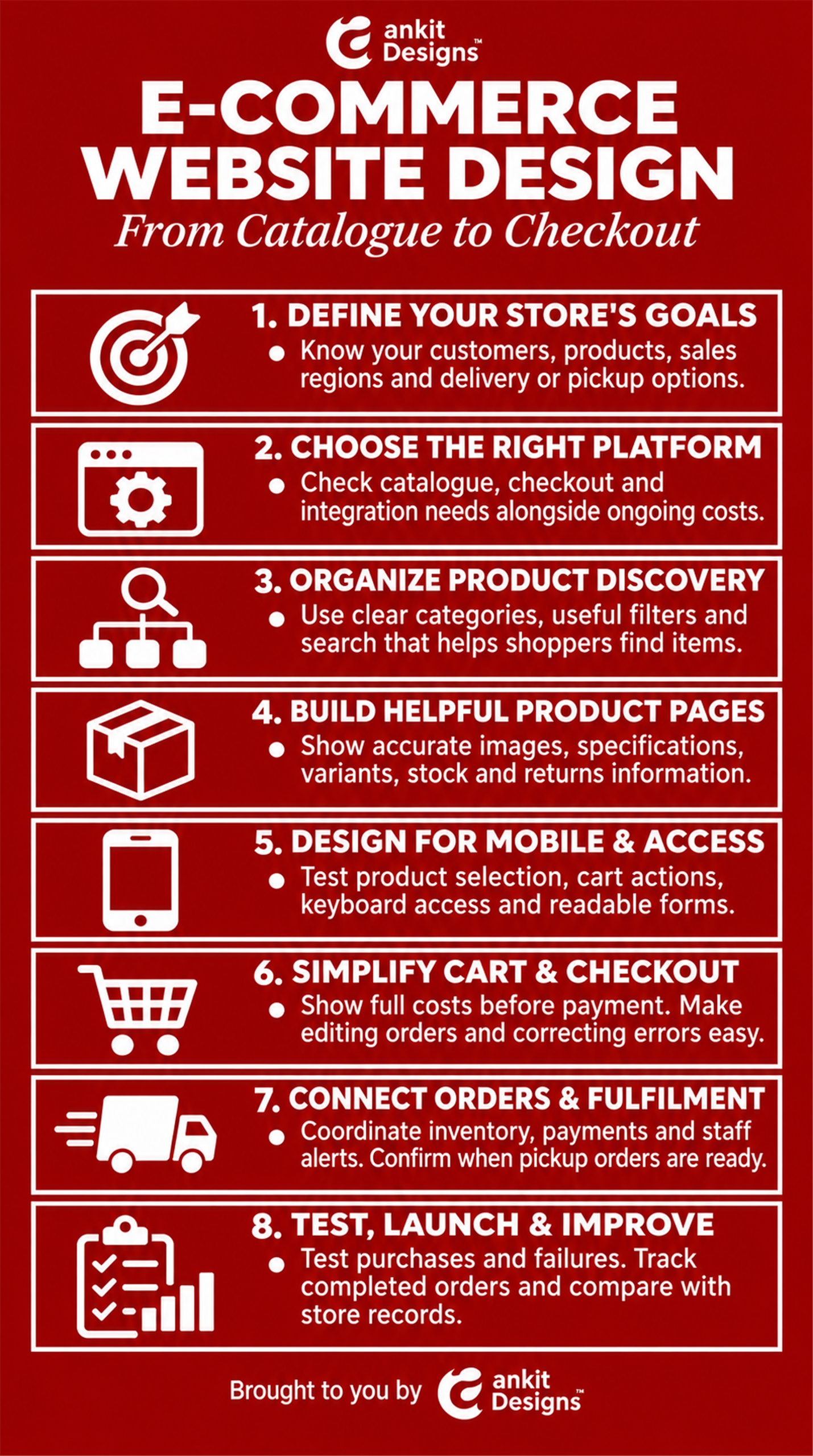
To design e-commerce websites, plan how customers will find products, compare options, and complete a purchase. Choose a platform that supports your catalogue and operations, then build clear navigation, informative product pages, and a straightforward checkout.
For an Etobicoke retailer, that journey may include shipping across Ontario or collecting an order locally. Each option needs accurate information and a process your staff can manage. This guide covers eight stages to help you plan your online store, evaluate design requirements, and decide where professional support would help.

Define Your Customers, Products, and Sales Goals
Start your e-commerce website design by identifying who buys from you and what they need to make a decision. Choose a primary goal, such as selling individual products, accepting wholesale orders, or offering subscriptions.
Record the requirements needed at launch. Schedule optional features for later when they serve a clear purpose.
Identify Buying Questions and Product Requirements
The information shoppers need depends on what you sell. Ask your sales and support teams which questions customers raise repeatedly.
Use those answers to plan product descriptions, photographs, and selection tools. Document variants, stock availability, and any purchase restrictions.
Set Your Sales Regions and Fulfilment Options
Decide where you will sell and how orders will reach customers. An Etobicoke retailer might offer storefront pickup alongside shipping, provided staff and systems can support both.
Define delivery boundaries, collection procedures, and relevant fees before designing those options. Make these requirements part of your platform brief.
Choose a Platform That Fits Your Store
Select an e-commerce platform after defining what your store needs to do. Compare how each option handles your products, customer journey, and daily operations.
Include the tools your team already uses for inventory, accounting, or fulfilment. Separate initial setup costs from ongoing subscriptions and transaction-related fees.
Compare Catalogue, Checkout, and Integration Requirements
Check whether the platform supports:
- Your catalogue: Product variants, stock levels, categories, and required specifications.
- Your checkout: Payment methods, guest purchasing, and appropriate delivery options.
- Your operations: Inventory connections, staff notifications, refunds, and order management.
- Your team: Editing permissions, training, support, and account access.
Ask for a demonstration of important tasks. Confirm which features are included and which require paid apps, higher plans, or custom development.
Ask what data you can export if you change platforms later.
Compare DIY Setup With Professional Design and Development
A DIY setup may suit a manageable catalogue and standard shopping requirements. Your team still needs to prepare product information, configure settings, and test orders.
Professional support can help coordinate more complex layouts, migrations, or integrations. When comparing website design and development services, request a written scope identifying who handles each task and what the finished store must demonstrate.
Confirm checkout customization limits before approving designs.
Organize Categories, Navigation, and Product Search
Organize your catalogue around how customers look for products. Use category names they understand rather than internal stock terminology.
Keep navigation labels consistent across desktop and mobile. Test the structure with someone unfamiliar with your catalogue before finalizing it.
Build Clear Paths From Categories to Products
Group products by useful distinctions, such as product type, intended use, or customer need. Add subcategories when they help shoppers narrow a large collection.
Breadcrumb links can show where a product sits and make returning to a category easier.
According to Google’s e-commerce site-structure guidance, links from menus through categories to product pages help Google discover and understand store content. Keep important products reachable through navigation rather than relying entirely on search.
Make Filters and Search Useful to Shoppers
Choose filters that match real buying decisions:
- Clothing: Size, colour, fit, and availability.
- Furniture: Dimensions, material, style, and price.
- Parts: Product type, model compatibility, and specifications.
Show which filters are active and provide an obvious way to remove them. Preserve selections when practical.
Test common searches, misspellings, and combinations that return no results. Offer helpful alternatives or a way to broaden the search.
Design Product Pages That Answer Buying Questions
A product page should help shoppers decide whether an item meets their needs. Start with an accurate title, useful photographs, a clear price, and a straightforward purchase action.
Organize supporting details so customers can scan the essentials and explore further. Check descriptions against supplier records or approved product documentation before publishing.
Present Product Images, Specifications, and Purchase Options
Choose images that show the product clearly, including relevant angles, details, and scale. Pair them with information customers need to assess suitability.
Clothing may need a size guide, furniture needs dimensions, and replacement parts need compatibility details. Keep descriptions specific to the item rather than repeating generic benefits.
Include relevant details such as:
- Materials, dimensions, capacity, or technical specifications.
- What the purchase includes.
- Care, assembly, or installation requirements.
- Available options and how to select them.
Display reviews only when authentic and appropriately attributed.
Explain Variants, Availability, Shipping, and Returns
Make the selected size, colour, or model obvious before customers add it to the cart. Update the displayed price and availability when a selection changes.
Clearly identify unavailable options and offer alternatives where appropriate. Place shipping, pickup, and returns information near the purchase decision.
Explain eligibility conditions without promising stock or delivery dates your systems cannot support.
Design for Mobile Shopping and Accessibility
Design your store so shoppers can complete tasks comfortably on smaller screens. A responsive layout needs testing beyond a mobile preview.
Include different screen sizes and input methods in your review. Test the complete shopping journey rather than the homepage alone.
Test Product Selection and Cart Actions on Phones
Ask someone to find an item, choose a variant, and add it to the cart. Check whether filters are easy to open and selections remain visible.
Make sure important details stay accessible when buttons or banners remain fixed on screen. Review image loading and unexpected layout movement.
Test cart editing with the on-screen keyboard open where relevant. Ankit Designs’ guide to responsive website design mistakes offers additional points to review.
Check Readability, Keyboard Access, and Form Usability
Include these checks:
- Text: Readable contrast and usable enlargement.
- Controls: Clear labels and visible keyboard focus.
- Product options: Understandable selection states and availability.
- Forms: Helpful instructions, errors, and confirmations.
According to W3C’s forms guidance, labels, instructions, validation, and notifications help people complete forms. Apply those principles to customer details, delivery choices, and checkout. Include third-party apps in the review.
Make Cart and Checkout Straightforward
Your shopping cart should help customers check their choices before paying. Show product names, selected variants, quantities, and prices clearly.
Make it easy to change quantities or remove an item, and update the total accordingly. Keep the route back to shopping available without losing the cart.
Show Costs Clearly and Offer Appropriate Checkout Options
Display delivery charges and applicable taxes before customers commit to payment. If costs depend on their address, explain when they will be calculated.
Show available shipping, delivery, or pickup options with accurate conditions. Offer guest checkout where your platform and business model allow it. Keep optional account creation separate from completing the purchase.
When reviewing abandoned carts, distinguish shopping difficulties from visits where someone was browsing without intending to buy.
Help Customers Complete Forms and Recover From Errors
Use familiar field labels and request only information needed for the order. Preserve valid entries when customers need to correct a mistake.
A failed payment should produce a clear message without implying that the order succeeded. Give customers a way to retry or choose another supported payment method.
Test submission behaviour so repeated clicks or retries do not create duplicate charges or orders.
Connect Orders to Inventory and Fulfilment
Your online store needs a clear process for handling each purchase after checkout. Define what happens automatically and what requires a manual check.
Assign responsibility for exceptions, including unavailable items and failed integrations.
Coordinate Stock, Payments, and Staff Notifications
Check how inventory updates when a customer orders, cancels, or receives a refund. If you also sell in a physical shop, verify how both channels share stock information.
Keep payment status separate from fulfilment status so staff knows whether an order is ready to process.
Confirm that notifications reach the right person and identify failed transfers. Agree on a backup process when connected systems stop working.
Explain Delivery, Local Pickup, and Order Readiness
For an Etobicoke pickup location, provide the verified address, opening hours, and practical entrance details.
Distinguish “available for pickup” from “ready to collect.” Send an order-ready notification after staff has prepared the items, making clear that an order confirmation alone does not mean collection is available.
Assign someone to handle delivery questions, cancellations, and returns.
Test, Launch, and Measure Your Store
Before launch, check that customers can complete purchases and staff can process them correctly. Test representative products, devices, and fulfilment options.
Include both successful purchases and situations where something goes wrong. Record each issue, assign a correction, and repeat the test.
Complete Test Orders and Live-Site Checks
Use your payment provider’s approved test mode to check:
- Products: Variants, quantities, prices, and stock restrictions.
- Promotions: Discount eligibility and totals.
- Fulfilment: Shipping charges, delivery regions, and pickup options.
- Payments: Successful transactions, declines, and retries.
- Notifications: Accurate order records, staff alerts, and customer emails.
For a redesign, check redirects from old product and category URLs. Confirm domain settings, HTTPS, backups, and public-page indexing settings.
Repeat key checks after publication using the provider’s recommended verification process.
Measure Completed Orders and Investigate Friction
Track product views, cart additions, checkout starts, and purchases as separate actions. Check that a purchase is recorded once with the correct transaction identifier, value, and currency.
Compare analytics with actual order records and account for cancellations and refunds. Investigate differences rather than assuming the reports will match automatically.
Use customer questions and observed difficulties to prioritize improvements.
When to Bring in an E-Commerce Design Agency
Consider professional support when your store’s requirements exceed your team’s time or technical capacity. A large catalogue, complex variants, connected inventory, or migration from an existing platform can add substantial work.
List the tasks your team can handle and those needing outside support. Include content preparation, configuration, testing, and maintenance.
Assess Internal Capacity, Integrations, and Migration Needs
Identify the systems that must connect and the data that must transfer. Assign responsibility for product information and decisions about fulfilment.
Use those requirements to assess whether your team has the time and expertise to manage the work alongside daily operations.
Evaluate Relevant Experience and Written Deliverables
Ask agencies to demonstrate comparable shopping journeys and explain their role in each project. Confirm platform experience, testing, handover, ownership, and support in writing.
Discuss your requirements through Ankit Designs’ Web Design Etobicoke service, and verify the proposed commerce integrations individually.
Frequently Asked Questions
What Pages Does an E-Commerce Website Need?
Alongside the shopping pages covered above, include contact information and clear shipping and returns policies. An About page can explain the business behind the store.
Account pages, order tracking, and other support tools depend on your customers’ needs and platform capabilities.
Do You Need Custom Development for an Online Store?
Not always. A platform’s existing features and a well-configured theme may support your requirements.
Custom development becomes useful when standard tools cannot adequately handle your layouts, product options, or integrations. Check ongoing maintenance costs before approving custom work.
Can a Physical Shop Offer Online Ordering and Pickup?
Yes, if the store’s platform and staff processes support it. Confirm which products qualify and how customers select the collection location.
Use the inventory and order-readiness process outlined above to keep the online store aligned with shop operations.
Plan Your Etobicoke Online Store With Ankit Designs
Turn Your Store Requirements Into a Clear Project Scope
Bring your product catalogue, customer needs, and fulfilment requirements to Ankit Designs. Discuss how its design and branding services can support the shopping journey you have planned.
Use the agreed scope to guide decisions and evaluate the finished store.
Contact Ankit Designs about your Etobicoke online store
Ankit Designs
Address: 2355 Derry Rd E Unit 38, Mississauga, ON L5S 1V6
Phone: +18662654810
Get in touch with our team today to schedule a consultation and discover how we can create a website tailored to your business goals.
Share

About the author:
I'm nobody's taxi service but I take pride in driving the bus! Upbeat, energetic serial entrepreneur on the quest to serve and help people. I enjoy long walks on short beaches and adventurous, adrenaline-pumping activities. I'm a normal bloke doing abnormal bloke things!
